Sunday, November 28, 2010

Sunday Spotlight

Hi everyone!!! Sherly here bringing you another Sunday spotlight! =)
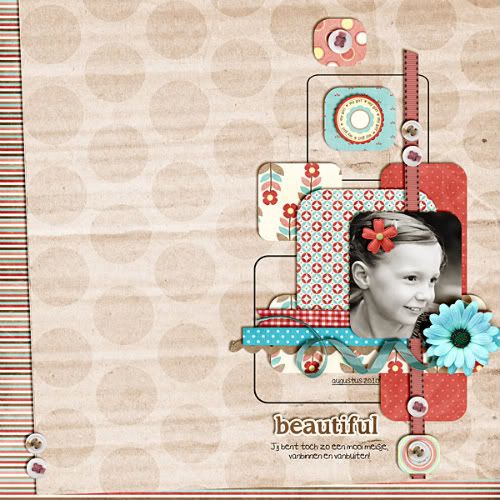
I've been going through galleries to look for some awesome LOs using Christy's goodies and voila! I found this simply-beautiful LO by Nikki:


Isn't it pretty? I love her clustering and those pictures are just perfect! She used Christy's Sugar Pie.


I personally love this kit. It's sweet and pretty... and yes, I have a soft spot for those beautiful papers!!! So, what are you waiting for? Grab some of Christy's awesome goodies HERE and who knows next time you'll be spotlighted here!

Wednesday, November 24, 2010

Recipe Round-up: Grammy's Cranberry Jello Salad

Happy Thanksgiving readers! We're celebrating here in the States and I (Leila) thought I'd come and share my favorite holiday dish with you all. For years, this jello salad was the highlight of my holiday meals. I sat at the kids' table though, so by the time the pan got to me, there was barely a bite left! My Grammy finally decided that it was time to make an extra batch of this scrumptious combination of ginger-ale, cranberry, pineapple and lemon jello for our table alone!  She really was the greatest, so in her memory I give you:

Grammy's Cranberry Jello Salad

1 (20 ounce) can pineapple tidbits or crushed pineapple
2 (3 ounce) packages lemon Jell-O gelatin
7 ounces ginger ale
1 (16 ounce) can cranberry sauce
8 ounces cream cheese
1 (2 ounce) package Dream Whip
½ cup pecans, chopped

Directions
Drain pineapple, reserving juice. Add water to make 1 cup.
Boil; add Jello, stirring to dissolve.Stir in ginger ale.
Blend pineapple and cranberry sauce.
Fold into Jello.
Pour into a 9x9 or 9x13 baking dish and chill.
Make Dream Whip according to package directions.
Beat in cream cheese.
Spread over Jello and top with chopped pecans.
You may add 1/4 to 1/3 cup powdered sugar to topping, if desired. I find it needs that touch of sweetness.
Skip the nuts if you don't like them. Also, make this the night before or your frosting will be runny!

I hope you'll all give this spin on Thanksgiving cranberries a try! I promise you won't be disappointed!! 

Tuesday, November 16, 2010

Hybrid--Matchbook Mini-Notebook

Happy Wednesday!!! Yay, we're half way through the week. Amanda here, and I'm so thrilled to be bringing you another round of hybrid fun with Christy's amazing designs.

Today I've got a matchbook mini-notepad, perfect for jotting down those things you need to remember. I've got this one all dolled up & looking Christmas-y, perfect for putting all those things your kidlets run around saying they want for Christmas.
Can you tell that I've got a mini-child in my house, who thinks they 'need' any & all toys they see advertised on TV?!

I'm working in PSE 5, but it shouldn't matter, which program you're working in because that part is super, super simple.

I started out with a blank canvas, that was 2.5 inches wide & 6 inches long. Then I put in a little brain work & decided that my matchbook would be about 2.5 inches tall when it was done. I created my layout by placing some guidelines at 3/4", 1 " & 3.5" . This separated my book into the sections I would need to design, this is going to be the cover for our little note pad.

**Note that the top section is going to flip up, so you'll need to design it upside down.

Added some papers & embellies & wah-lah, beautiful!! You can fit more than one of these on a sheet, but I've only done one for today.


Print it out on card-stock (I just used, regular ol' white card-stock). Cut out & fold up, where you had the guides in your designing program & we're almost done.


Take a blank sheet of paper, maybe 2 or three depending on how thick you want your notepad & cut it into squares that are small enough to fit in the book, about 2.25". You'll need to score the cover in four places before inserting the papers. Score the cover at .75", 1", 3.25" & 3.5 ", I don't have a fancy scoring tool, so I use the back of a tiny pair of scissors, cutting mat & ruler.


Stack them neatly, place them inside the match book, staple near the center.


Fold the little short side up over, secure it with a little glue, or if you want the rustic staple on the outside look, you can staple it, I didn't do either & just left it as is. Flip the top cover down, tuck in & there you have it, a super cute, little matchbook notepad for all your notes on the run.


Created using A Year in the Life: December . Get it here or purchase it with the entire Year in the Life Collection here.

Come back & link us up to your little matchbooks & we'll leave you some love!

~Amanda

Tips and Tricks Tuesday

Hi everyone! Kim here bringing you today's Tips and Tricks Tuesday!
I sometimes hear from fellow scrappers that they're finding it hard to scrap with patterned papers. I personally love patterned papers, my pages wouldn't feel complete without them! I cut strips from them or I use them as a mat for my page or I sometimes even use the entire patterned paper as a background. Today I wanted to share a tip on how you could use them differenty.
Instead of just cutting out strips or rectangles or circles from them, have you ever tried the custom shape tool in Photoshop? You could use any custom shape as a clipping mask for your papers!

In the example below I used the rounded rectangle tool. You can find that tool in the dropdown menu of the rectangle tool. To draw a rounded rectangle, you need to set the radius of the rounded corners first. (in the top menu bar) In my example I set it to 30 points (type 30 pt). Then you make a new layer and drag with your tool to draw the rounded rectangle (hold shift to make a rounded square). Then, drag a patterned paper on top of that layer, right click and choose: make clipping mask. And that's it! Repeat with different patterns and arrange them in an appealing way. For the outlined rounded rectangles, I first drew my shape on a separate layer, then I selected the shape, made a new layer and made a stroke around my selection on the new layer (Edit/Stroke). Then I deleted the original shape layer.

You could also experiment with other custom shapes, Photoshop has plenty of them!
I hope this tip was useful to you!


This page was created using Sugar Pie by Christy Lyle.


And the kraft polka dot paper is from the Krafty Dotty paperpack.

Sunday, November 14, 2010

Sunday Spotlight

Good Morning to all this Sunday morning! I'm Corinne excited to be here on Christy's team and write my first blog post for her. Today, I'm bringing you Spotlight Sunday where we showcase someone of something. That something today is Christy Lyle's new release since she opened her store on November 1. It's a Halloween themed kit titled, The Haunted. For those who have yet to scrap this year's Halloween pictures (like myself) this is a great kit to have to showcase those scary and not so scary costumes, trick or treating, Halloween parties, ghouls and goblins, and everything associated with the October 31 holiday. Of course, I left with inspiration from the creative team who made some spooky layouts with The Haunted. Thank you for stopping by!

Thursday, November 11, 2010

Recipe Roundup

Hey everyone!!! It is Heather here with your Recipe Round-Up. I must admit that I am not a huge cook….not that I don’t want to be but never learned. Growing up we lived on boxed meals. After all, my mom only knew three seasonings (garlic, salt, pepper, and did I already mention GARLIC?). That little glove (Hamburger Helper) was family and we spent our time baking instead. Thank goodness my husband cooks or else we would either starve or be sick to death of things that come from a box. LOL

So for today I want to share one of my absolute favorite recipes that I received when someone brought my family dinner after I had my first son. The meal was fabulous (creamy chicken enchiladas) but really I live for dessert so the recipe that I am sharing is for the most fabulously scrumptious chocolate chip cookies. These are perfect as an after school snack or to make an ice cream sandwich just add your favorite flavor. To make it perfect for the holidays, peppermint ice cream is awesome with these….and a little chocolate syrup on top is heavenly if you need a little more chocolate. Crushed candy canes make the perfect garnish too.

Now on to the recipe….

1 c. Butter Flavored Shortening
¾ c. Brown Sugar
¾ c. Sugar
2 Eggs
1 tsp. Vanilla
1 tsp. Baking Soda
1 tsp. Salt
2 ¼ c. Flour
1 bag Chocolate Chips

Preheat oven to 375 degrees. Cream sugars and shortening. Add eggs and vanilla and beat well. Sift together soda, salt and flour and add to mixture. Add chocolate chips and nuts. Drop by spoonful onto ungreased cookie sheet. Bake for 11 minutes.

That is it! Enjoy! Can’t wait to hear back if you made these little beauties and how they turned out.

Wednesday, November 3, 2010

Hybrid Hotness: Cards!

Happy Wednesday! Joana here to share a few of the hybrid cards I've made with Christy's fabulous kits. I am SO excited she's back in the digi-designing business!

Have you seen the wonderful kits from the A Year in the Life collection? I love these - they're great for 365 projects, calendars for yourself or for gifts for the grandparents, and also for hybrid projects such as cards!


I used A Year in the Life: May for this card.


This card was made with A Year in the Life: January. I love all of the purples and blues in this kit!


And finally, this card was made with Sugar Pie.


All of the stamps on my cards are from the Flowers2Share set by The {Stamps} of Life.

Monday, November 1, 2010

And we're live!!!!!


If you haven't heard already, Christy Lyle Designs is open for business!!! And it's a great sale too - 35% off!!!! So hurry, there's an amazing new Halloween kit for all those pictures you took last night. Plus the A Year In The Life Collection that is perfect for making those calendars for your loved ones for the holidays. And we can't forget about Sugar Pie, All American and those Krafty Damasky and Dotty paper packs!

We are all looking forward to this new adventure with Christy! Have fun shopping and we will be back with more in store for Digital Scrapbooking Day this Saturday!

Thursday, October 28, 2010

The countdown is on!

Only 4 more days!!!! Mark your calendars!!!!!

Sunday, October 10, 2010

Wow! I feel so loved!!

Thanks to everyone who sent in their applications and other emails of congratulations that I'm coming back!  Again, I have the tough job of picking a handful of new Creative Team Members from the ones who applied!  I will be sending out invites later tonight so if you applied, stay close to your inboxes!!  Thanks again for making me feel so loved!!

Tuesday, October 5, 2010

I just couldn't stay away!!

After taking a short break from digital designing, I am ready to come back!  I'm extremely excited about starting this new chapter in my life - digital scrapbooking store owner!!  I have been busy putting the finishing touches on the new site and I can't wait to open up shop so you to see it!  I hope that you will join me in celebrating my grand opening very soon so stay tuned right here for more details about the official Grand Opening date and events!

In the meantime, I am looking for some new Creative Team Members so if you are interested in using my designs, I have this for you:


If you are unable to see the above image, here is the info:


I’m looking for some inspiring, enthusiastic and creative scrappers and hybrid artists to join my Creative Team!

As part of my Team you will:

- create one layout or project per kit within a week of its release
- post your layouts and projects in two online galleries
- post monthly on the Team blog


If you think you would be an amazing addition to my Team, send an email to:
call@christylyledesigns.com
with the following information by Friday, October 8, 2010


- your full name and username(s) you use online
- a link to your gallery you feel shows your best work
- a list of your current Creative Teams and requirements
- why you want to be a part of my Creative Team